Keywords: Agent Assist, agent copilot, RAG, human-in-the-loop, insurance customer service
For a while I have been building an FAQ chatbot for insurance customers. It handles plenty of common questions, but the longer I worked on it, the clearer one thing became: in a heavily regulated industry like insurance, where wrong answers are expensive, fully automated replies are not the best answer for every conversation. Many conversations, especially those about claims, cancellations or exact benefit amounts, still need a human agent to sign off.
So I flipped the approach. Instead of having the AI answer the customer, let it sit next to the agent. When a customer message arrives, the AI has already prepared a draft reply, the knowledge it relied on, and the facts that still need confirming. The agent glances at it, edits a few words and hits send. This post walks through the design of that “customer service copilot” prototype.
All examples come from a fictional insurer: product names, terms and amounts are made up. Section 3 has an interactive demo you can step through and zoom into, or you can open the prototype in a new tab and explore freely.
1. What already exists
None of this is new. The industry calls it Agent Assist / Agent Copilot:
| Vendor | Product | Highlights |
|---|---|---|
| AWS | Amazon Connect + Amazon Q in Connect | Real-time reply and knowledge-article suggestions during calls/chats |
| Contact Center AI Agent Assist | Smart Reply, Knowledge Assist with FAQ citations | |
| Salesforce | Einstein Service Replies / Agentforce for Service | Drafts plus Knowledge Article citations |
| Microsoft | Dynamics 365 Copilot for Customer Service | Drafts, summaries, knowledge Q&A with sources |
| Zendesk / Intercom | Agent Copilot / Fin Copilot | Side-panel drafts and sources, one-click insert |
| China market | Alibaba Cloud, NetEase Qiyu, Sobot, etc. | Suggested scripts, knowledge recommendations |
They share three traits:
- AI drafts, a human sends.
- Every suggestion has a source the agent can trace.
- What the agent changed is recorded and fed back into the knowledge base and models.
If your company already runs one of these contact-center platforms, check whether its built-in copilot can plug into your own knowledge sources first. That is often cheaper than building your own. I built a prototype because the knowledge base and retrieval logic already lived in our own system, and I wanted to validate the interaction before deciding how to integrate it.
2. Design principles
Before drawing any screens, I wrote down five principles. Every later trade-off was judged against them:
- AI drafts, humans send. The AI never talks to the customer directly.
- Every sentence has a source. Key sentences in the draft carry
[1][2]citation markers; one click shows the original text. Whether agents trust a draft depends on how quickly they can verify it. - Understand the context before answering. “How much do I get for a flight delay?” has completely different answers depending on product and plan. When the context is unclear, ask rather than guess.
- When unsure, help the customer narrow it down. A good clarifying question is itself a good reply.
- Every interaction is feedback. Each edit, checkbox and thumbs-down is data for improving the knowledge base and evaluating the model.
3. The UI: four columns (interactive demo)
What’s embedded below is the prototype itself, not a screenshot. As you move through the slides, each one switches the prototype to the matching scenario and outlines in red what the slide is about.
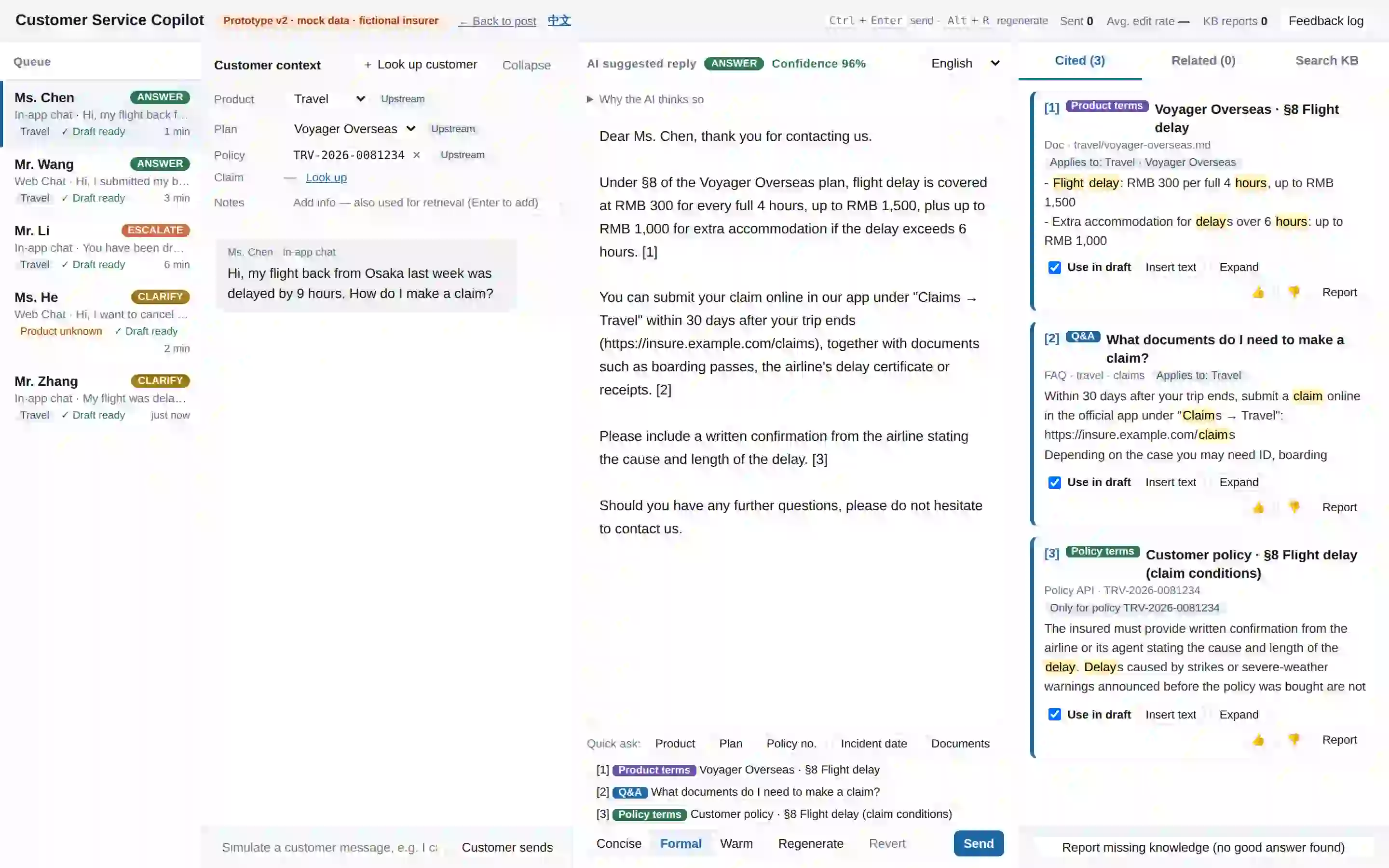
- Queue: every waiting conversation already has a draft generated in the background, tagged with its intent (answer / clarify / escalate) and product. When the agent switches to it, the draft is ready. No waiting.
- Customer context: the known facts for this conversation, all editable (see section 5).
- AI suggested reply: streamed and directly editable, with an intent banner and a collapsible “Why the AI thinks so” section on top.
- Knowledge panel: three tabs (Cited / Related / Search the whole KB). On each card the agent can include it in the draft, insert its raw text, rate it, or report a problem.
4. Core flow
Customer msg ─┐
              ├─▶ ① Infer context ─▶ ② Retrieve ─▶ ③ Decide intent ─▶ ④ Assemble draft
Agent notes  ─┘    (product/plan)     (filter &       (answer /         (citations +
                                       grade by        clarify /         clarifying
                                       context)        escalate)         question)
                       ▲                                                     │
                       └──────── agent edits context / picks sources ◀───────┘
The key point: this is a loop, not a pipeline. Any change the agent makes to the context or to the selected sources reruns ②③④.
5. Context: make “known facts” explicit
If the context is just a few read-only lines, the gaps show up quickly once you picture how agents actually use it:
- Upstream systems may send incomplete information. For example, we know it’s travel insurance, but not which plan.
- Facts the AI “guessed” from the conversation need to be distinguishable and correctable.
- After looking up the customer, the agent needs a way to attach the policy they found to the conversation.
So the context is an editable panel where every field shows its origin:
| Field | Possible origins |
|---|---|
| Product | Upstream system / AI inference / Agent / Record lookup |
| Plan | Same as above |
| Policy number | Upstream system / Record lookup |
| Claim number | Upstream system / Record lookup |
| Agent notes | Added manually by the agent (also used for retrieval) |
A few details:
- AI inferences should look tentative. Inferred values appear as dashed tags with the evidence (“from the customer’s message: flight, delay”) and a “Confirm” button. Until confirmed, sending triggers a warning (“Plan was inferred by AI, please confirm”) and the confidence score is lowered.
- The agent overrides the AI. If the agent resets the product to “Unknown”, the AI won’t infer it back on its own. The implementation is simple: store an
originper field and skip inference whenorigin = agent. - Lookup beats typing. Search by name, phone, policy number or claim number. Selecting a policy fills in product and plan. Selecting a claim also brings in the policy it belongs to. If a customer has both a travel and a home policy, the draft answers for whichever one the agent picks.
- Should a context change refresh the draft? My rule: if the agent hasn’t touched the draft, regenerate it immediately. If they have edited it, don’t overwrite. Show “Context changed — regenerate with new context” instead. Never throw away the agent’s work.
6. Clarification: when unsure, let the customer narrow it down
Each knowledge item is tagged with an applicability scope (which product, which plan), and the current context decides what happens to it: items that clearly don’t match are dropped; items whose product or plan is still unknown are “held”; personal records (policies, claims) are only used when the number matches.
Held items stay out of the draft. They still appear under “Related” with a yellow “Plan unknown” tag, and the agent can include them manually. Intent detection then handles three kinds of clarification:
| Situation | Example | How the draft is written |
|---|---|---|
| Product unknown | “I want to cancel my policy — can I get a refund?” | List only the products the knowledge actually matched (e.g. travel, home) for the customer to pick, and mention they can share a policy number instead |
| Product known, plan unknown | “My flight was delayed 7 hours — how much can I claim?” | Answer the generic part first (how to make a claim), then list that product’s plans; hold back plan-specific details such as benefit amounts |
| Not enough knowledge | Nothing relevant in the KB | Ask the customer for more details, and nudge the agent to “Report missing knowledge” |
Two points worth stressing:
- Narrow the options. Asking “Which type of insurance did you buy?” and then listing every product line is a poor experience. List only the ones the knowledge matched, so the customer can pick at a glance.
- Answer what you can first. With the plan unknown, “how to make a claim” doesn’t depend on the plan and can be answered now. Only the benefit amount waits for the plan. The exchange doesn’t feel evasive.
Once the customer replies “I have plan X”, the AI infers the plan (marked as an AI inference), re-runs retrieval, and the draft becomes a proper answer citing that plan’s delay terms.
Below the draft is a row of quick-ask buttons (product, plan, policy number, incident date, documents). The one most relevant to the current situation is highlighted, and a click inserts the question at the cursor.
7. Compliance guardrails
Some things an insurance agent must not say. The prototype flags them in real time with simple rules:
- Commitment wording: “definitely covered”, “guaranteed”, etc.
- Possible personal data: phone-number or ID-number patterns.
- Lost grounding: intent is answer but the agent deleted every citation marker.
- Unconfirmed inferences: the context still contains AI-inferred fields the agent hasn’t confirmed.
Also, when the customer’s message mentions a complaint, a lawyer or a regulator, the intent goes straight to escalate. The draft then leads with an apology and the follow-up arrangement, and suggests handing over to a dedicated colleague.
These rules are crude, and production needs something more robust. At the prototype stage, though, they show business stakeholders where guardrails should appear and what they should look like.
8. Feedback loop: turn every agent action into data
The prototype logs these events and can export them as JSON:
| Event | Purpose |
|---|---|
sent: AI draft vs. what was actually sent, to compute the edit rate | Core metric for draft quality |
context_change / context_confirm | Accuracy of AI inference; how often upstream data is missing |
source_added / source_removed | Surfaces retrieval-ranking problems |
source_rating (👍/👎) | Quality of individual knowledge items |
kb_report (wrong / outdated / missing) | Routed straight to knowledge-base owners |
quick_ask | Which clarifications are most common, to guide context collection |
The edit rate is a normalized edit distance:
edit_rate = levenshtein(ai_draft, final) / max(len(ai_draft), len(final))
0 means sent as-is. The closer to 1, the more was changed. It isn’t perfect, since changing a key number weighs the same as rewording a pleasantry, but it is simple enough to start tracking trends. Each sent event carries the AI draft, the final text, the context and the citations, so it is a ready-made evaluation sample. Over time this builds into a regression test set labeled by frontline agents.
Closing thoughts
My biggest takeaway from this prototype: the hard part of a customer service copilot is not generation. It is context and trust.
- Without clear context, even the most fluent draft misses the point. So make the context explicit, have the AI narrow things down when it’s unsure, and let the agent correct it at any time.
- Without the agent’s trust, even a great draft gets deleted and rewritten. So every sentence needs a source, every inference needs to say “this is my guess”, and every guardrail needs to fire before sending.
The AI’s role here isn’t to replace the agent. It’s to let agents spend less time digging through documents and more time making judgment calls.
The company, products, terms, conversations and data in this post are all fictional and do not correspond to any real insurer or product.